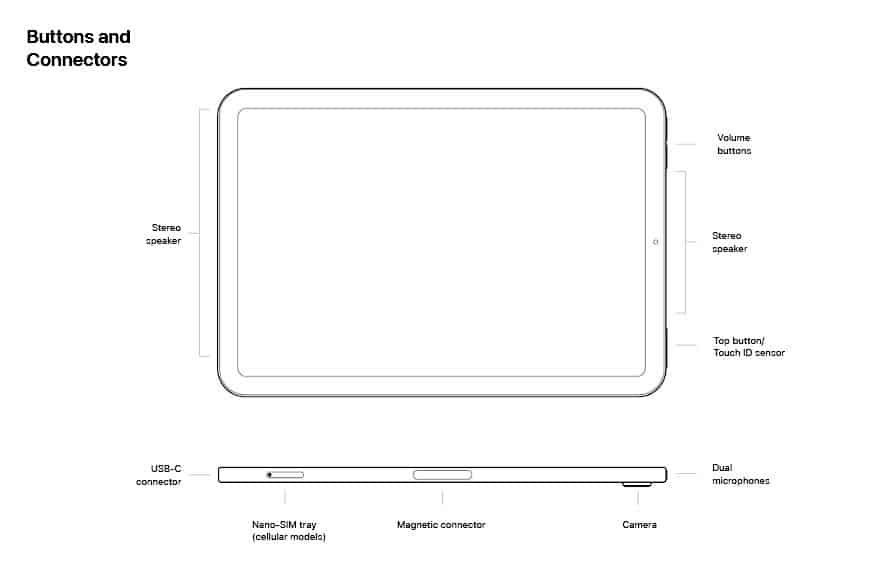
When you pick up a device like the iPad mini 6, the first thing that truly captures your attention—and keeps it—is its screen. More than just a window to your digital world, the iPad Mini 6 Screen Size & Display Specifications define much of the tablet's user experience, from the vividness of your photos to the readability of your emails, and the fluidity of your games. This isn't just about raw numbers; it's about how Apple engineered a compact display to deliver a premium visual experience.
This guide dives deep into what makes the iPad mini 6's display stand out, helping you understand the tech behind the visuals and how it impacts your daily use.
At a Glance: iPad Mini 6 Display Essentials
- Screen Size: 8.3-inch Liquid Retina display (measured diagonally).
- Resolution: 2266 by 1488 pixels.
- Pixel Density: 326 pixels per inch (ppi).
- Display Technology: LED-backlit Multi-Touch display with IPS technology.
- Color Accuracy: Wide color (P3) support.
- Dynamic Adjustment: True Tone technology.
- Brightness: 500 nits typical brightness.
- Clarity: Antireflective coating.
- Apple Pencil Support: Supports Apple Pencil (2nd generation).
Why the iPad Mini 6's Display Matters So Much
The iPad mini 6 marked a significant redesign for Apple's smallest tablet, and the display was at the heart of that transformation. Moving from a 7.9-inch screen to a larger 8.3-inch Liquid Retina display, while keeping the overall footprint remarkably similar, was a masterclass in engineering. This change wasn't just about adding real estate; it was about modernizing the visual experience, pushing bezels to the edges, and integrating advanced display technologies previously reserved for larger, more expensive iPads.
For users, this means a more immersive experience for everything from reading e-books to watching movies, all in a device that still fits comfortably in one hand or a small bag. It’s a delicate balance: maximum screen, minimum device.
The Heart of the Visuals: 8.3-inch Liquid Retina Display
Let's break down the core components of the iPad mini 6's display, piece by piece, to truly appreciate its capabilities.
Physical Dimensions: An Expansive View in a Compact Body
The iPad mini 6 features an 8.3-inch Liquid Retina display, measured diagonally. This might sound like a small bump from its predecessor's 7.9 inches, but it represents a substantial shift in design philosophy. By shrinking the bezels around the screen and removing the traditional Home button (relocating Touch ID to the top button), Apple maximized the display area without dramatically increasing the tablet's physical dimensions.
The tablet itself measures 7.69 inches (195.4 mm) in height, 5.3 inches (134.8 mm) in width, and a mere 0.25 inch (6.3 mm) in depth. This compact form factor, combined with the larger screen, makes the iPad mini 6 incredibly portable while still offering a generous viewing experience. It's truly pocketable for many, and a pleasure to hold for extended periods, distinguishing it from larger tablets which can feel cumbersome. If you’re curious about how this size compares to other models, check out our iPad mini 6 size guide.
Pixel Perfect: Resolution and Pixel Density
The iPad mini 6 boasts a resolution of 2266 by 1488 pixels. This high pixel count, packed into an 8.3-inch screen, results in an impressive 326 pixels per inch (ppi). For most users, this translates to images and text that are incredibly sharp and detailed. You won't see individual pixels unless you press your nose right up against the screen, which is the hallmark of Apple's "Retina" display standard.
This high pixel density is crucial for an enjoyable experience whether you're reading a novel, editing photos, or browsing websites. Graphics appear crisp, text is smooth, and fine details in images are rendered with remarkable clarity, avoiding any jagged edges or pixelation.
The Magic Behind the Pixels: Liquid Retina Technology
The term "Liquid Retina" isn't just marketing jargon; it encapsulates a suite of technologies that work together to create a superior visual experience. For the iPad mini 6, this includes:
- LED-backlit Multi-Touch display: This is the foundation, providing vibrant and energy-efficient illumination across the screen. The Multi-Touch aspect allows for intuitive gestures and interactions.
- IPS technology (In-Plane Switching): IPS panels are renowned for their wide viewing angles and excellent color reproduction. This means colors remain consistent and accurate, even if you're not looking at the screen straight on, which is fantastic for sharing content with others or using your iPad in various orientations. This underlying technology ensures a robust visual foundation, making it one of the most important aspects to consider when understanding Liquid Retina technology.
A Spectrum of Color: Wide Color (P3)
The iPad mini 6's display supports Wide color (P3). This is a significant feature for anyone who values color accuracy and vibrancy. P3 color gamut is capable of displaying a broader range of colors than the sRGB standard, especially in the reds and greens.
What does this mean for you? Photos and videos will look more lifelike, with richer and more accurate colors. For creatives, this is invaluable for editing images or videos, ensuring that what you see on your iPad mini is a faithful representation of the final output. For casual users, it simply means a more visually immersive and pleasing experience, making everything from streaming services to social media feeds pop with true-to-life hues.
Dynamic Adaptability: True Tone Technology
True Tone is one of those features you might not notice until it's gone, but it subtly enhances your viewing comfort. This technology uses advanced multi-channel sensors to adjust the color and intensity of your display to match the ambient light in your environment.
If you're in a brightly lit office, the screen will subtly shift its white point to appear more neutral. If you're under warm incandescent light at home, the display will adapt to a warmer tone. The result is a more natural and comfortable viewing experience that reduces eye strain, making it easier to read or watch content for longer periods. It feels like looking at paper, rather than a glowing screen, especially when reading articles or books.
Clarity in Any Light: 500 Nits Brightness and Antireflective Coating
The iPad mini 6 display offers 500 nits of typical brightness. Nits are a measure of luminance, and 500 nits is a respectable figure for a tablet, ensuring that your content remains visible even in brightly lit environments or outdoors. While not the brightest display on the market, it’s certainly sufficient for most indoor and many outdoor scenarios, offering good legibility.
Coupled with the brightness is an Antireflective coating. This coating significantly reduces glare, which is a common nuisance on glossy screens. Whether you're under harsh office lights, near a window, or trying to use your iPad mini outdoors, this coating helps minimize reflections, keeping your content front and center. It's a subtle yet impactful feature that contributes greatly to the overall usability of the device in varied lighting conditions.
Creative Canvas: Apple Pencil (2nd Generation) Support
A key aspect of the iPad mini 6's display interaction is its support for the Apple Pencil (2nd generation). This magnetic attachment and wireless charging capability transforms the display into a powerful tool for note-taking, sketching, and intricate creative work.
The display's responsiveness, low latency, and pressure sensitivity work in harmony with the Apple Pencil 2, making drawing feel incredibly natural, almost like pen on paper. This makes the iPad mini 6 a go-to device for students, artists, and professionals who need a compact digital canvas. It’s a far cry from the first-gen Pencil experience, offering seamless integration and a more intuitive workflow. If you’re looking to get the most out of this feature, exploring Apple Pencil 2nd Gen features can unlock new possibilities.
Beyond the Pixels: How Display Specs Impact Your Experience
Understanding the technical specifications is one thing, but how do these translate into real-world use? The iPad mini 6's display is engineered to enhance specific user experiences.
Reading and Browsing: Your Portable Library
With its 8.3-inch screen and crisp 326 ppi resolution, the iPad mini 6 is an exceptional device for reading. Text appears sharp and clear, making long reading sessions comfortable, especially with True Tone adjusting the white balance. Whether you're diving into an e-book, catching up on news articles, or scrolling through web pages, the display's clarity and adaptive lighting make it a joy. The anti-reflective coating further helps by minimizing distractions from overhead lights or sunlight.
Media Consumption: Entertainment On-the-Go
For movies, TV shows, and YouTube videos, the iPad mini 6 offers a surprisingly immersive experience for its size. The P3 wide color gamut ensures vibrant and accurate colors, bringing content to life. While not an OLED, the Liquid Retina display provides good contrast and detail, making it a great personal entertainment device for travel or unwinding. The stereo speakers, combined with the expansive screen, create a mini cinematic experience in the palm of your hand.
Productivity and Creative Tasks: A Powerful Pocket Studio
Thanks to Apple Pencil 2 support and the accurate, responsive display, the iPad mini 6 becomes a versatile tool for productivity and creativity. You can take handwritten notes, annotate documents, sketch out ideas, or even do light photo editing with precision. The larger screen compared to previous minis means less zooming and panning, making these tasks more efficient. Paired with essential iPad mini accessories, it becomes a truly powerful mobile workstation.
Gaming: Immersive Fun in Your Hand
Gamers will appreciate the vibrant colors and sharp details offered by the Liquid Retina display. Casual games look fantastic, and even more graphically intensive titles benefit from the screen's quality. While the A15 Bionic chip (powering the Mini 6) does the heavy lifting for performance, the display ensures that all those rendered graphics look their absolute best, providing an engaging and smooth visual experience.
Common Questions & Noteworthy Characteristics
Even with top-tier technology, users often have specific questions or observe unique characteristics.
Is the 8.3-inch screen size genuinely "mini"?
Yes, absolutely. While it's larger than its predecessor, the iPad mini 6 remains significantly smaller and lighter than the standard iPad Air or Pro models. Its dimensions (7.69 x 5.3 x 0.25 inches) make it incredibly portable. It strikes a balance, offering more screen real estate than a large smartphone while still being far more manageable than a full-sized tablet. It’s perfect for those who find even the smallest iPhones too cramped for media consumption or detailed work, but don’t want the bulk of a larger iPad. If you're weighing your options, comparing it to other models like the iPad mini vs. iPad Air can clarify its niche.
What about the "jelly scrolling" phenomenon?
The iPad mini 6 famously experienced a "jelly scrolling" effect, where one side of the screen appears to refresh slightly slower than the other when scrolling quickly in portrait orientation. While Apple stated this is normal behavior for LCD screens, it was noticeable to some users. It's a characteristic of the display's refresh mechanism rather than a flaw in its resolution or color. For most casual use, it's not a deal-breaker, but it's something to be aware of if you're particularly sensitive to screen uniformity. It primarily affects text-heavy content when rapidly scrolling, and tends to be less apparent in landscape mode.
How does 500 nits brightness hold up in bright sunlight?
While 500 nits is good for indoor and many outdoor situations, direct, intense sunlight can still wash out the screen. The antireflective coating helps, but no LCD is truly sunlight-proof. For optimal viewing in very bright conditions, seeking shade is always recommended. However, for everyday outdoor use like reading on a patio or checking maps on the go, it's generally sufficient.
Is the Mini 6 display suitable for professional creative work?
For on-the-go sketching, quick photo edits, and note-taking, absolutely. The P3 color gamut, high resolution, and Apple Pencil 2 support make it very capable. However, for highly color-critical work or tasks requiring expansive screen real estate (like complex video editing or graphic design), larger iPad Pro models with ProMotion (120Hz refresh rate) and higher peak brightness might be preferred. The Mini 6 excels as a portable creative companion, not necessarily a primary workstation for intensive visual tasks.
Making the Most of Your iPad Mini 6 Display
To fully appreciate the visual prowess of your iPad mini 6, consider these tips:
- Adjust True Tone & Night Shift: While True Tone is automatic, you can also manually enable Night Shift for warmer colors during evening hours to further reduce eye strain. Find these options in Display & Brightness settings.
- Optimize Text Size: If you primarily use your Mini for reading, experiment with different text sizes in accessibility settings. The high pixel density ensures even larger text remains crisp.
- Clean Your Screen Regularly: The antireflective coating works best on a clean screen. Use a soft, lint-free cloth (like a microfiber cloth) to wipe away smudges and fingerprints.
- Utilize Split View & Slide Over: Even on an 8.3-inch screen, iPadOS's multitasking features (Split View for two apps side-by-side, Slide Over for a third floating app) can leverage the display efficiently for increased productivity.
The Verdict: A Display Built for Versatility
The iPad mini 6's 8.3-inch Liquid Retina display with its 2266x1488 resolution, 326 ppi pixel density, Wide color (P3) support, True Tone, 500 nits brightness, and antireflective coating isn't just a list of technical specs. It's a meticulously designed visual engine that delivers a premium experience in a remarkably compact form factor.
From vibrant media consumption to precise creative work with the Apple Pencil (2nd Gen), this display punches well above its size. It confirms that "mini" doesn't have to mean "compromise" when it comes to visual quality. Whether you're a reader, a gamer, an artist, or just someone who loves having a powerful, high-quality screen in a highly portable package, the iPad mini 6's display delivers a compelling and versatile experience that remains a standout feature of the device. Don't forget to look into optimizing your iPad's battery life to keep enjoying that brilliant display for longer.